operating system with the October 2018 update (version 1809) that
allowed Microsoft Store apps with extensive file system permission
to access all files on users’ computers without their consent.
With Windows 10, Microsoft introduced a common platform, called
Universal Windows Platform (UWP), that allows apps to run on
any device running Windows 10, including desktop PC, Xbox, IoT,
Surface Hub, and Mixed-reality headset.
UWP apps have the ability to access certain API, files like
pictures, music, or devices like camera and microphone, by
declaring required permissions in their package manifest
(configuration) file.
By default, UWP apps have access to directories, where the app is
installed on the users’ system and where the app can store data
(local, roaming and temporary folders).
However, to access other files on a system, including sensitive
resources, Microsoft offers several types of capabilities that an
application can use by declaring their permission in the manifest
file.
One such extensive capability, called
broadFileSystemAccess (Broad Filesystem Access), allows an
application to access the file system at the same level as the user
who launched the app.
However, according to Microsoft, this is a restricted capability
that, if used, will trigger a user-consent prompt while users first
launch the app, asking them to grant or deny this permission to the
app.
“On first use, the system will prompt the user to allow access.
Access is configurable in Settings > Privacy > File system.
If you submit an app to the Store that declares this capability,
you will need to supply additional descriptions of why your app
needs this capability, and how it intends to use it,” Microsoft
documentation says[1].
Windows 10 version prior to October 2018 Update failed to display
prompts for permission to access the file system due to a bug,
apparently leaving users sensitive data exposed to apps downloaded
from Windows Store.
In other words, until version 1809, the apps could actually be used
to access the entire file system without prompting users for the
permission.
Lachance learned about the bug when one of his
application that uses broadFileSystemAccess permission started
crashing after he installed the Windows 10 October 2018 Update.
[2]
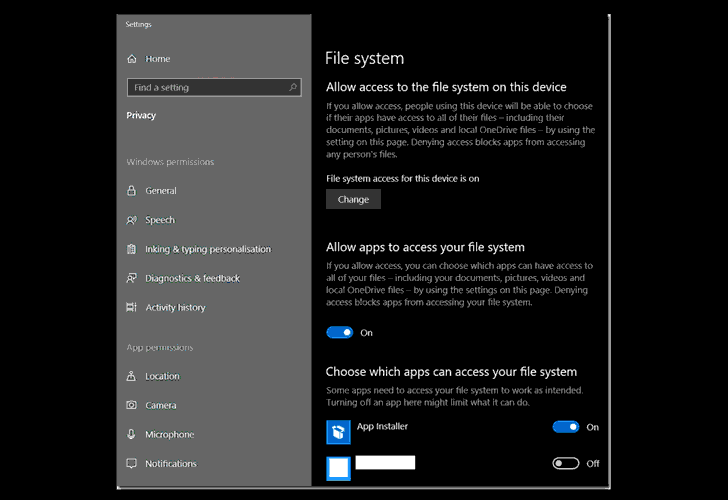
latest Windows 10 update addressed the prompt issue by turning the
‘broadFileSystemAccess’ setting OFF by default, all UWP apps may
need to be updated to prevent crashes.
In order to prevent crashes, Andrew suggested Windows app
developers include a simple line of code in their affected software
that will force their users to accept the new file access
permission in the settings before launching the application.
Since Microsoft halted[3] the roll-out of the
Windows 10 October Update due to a file-wiping bug, users who don’t
have the update can restrict UWP apps access to the file system on
their Windows 10 computer via Settings → Privacy → File system.
Read more http://feedproxy.google.com/~r/TheHackersNews/~3/5Q3xovAB1pA/windows10-uwp-apps.html