
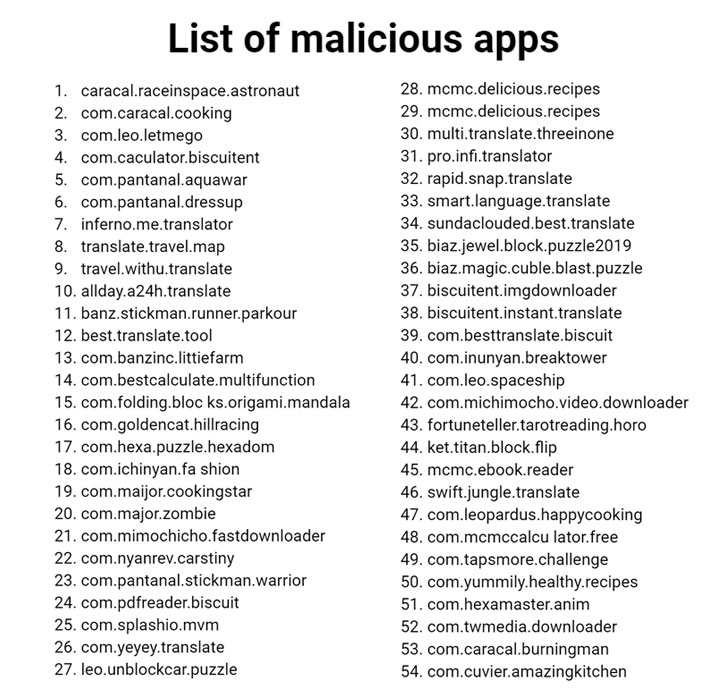
which were designed for kids and had racked up almost 1 million
downloads between them—have been caught using a new trick to
secretly click on ads without the knowledge of smartphone users.
Dubbed “Tekya,” the malware in the apps imitated users’
actions to click ads from advertising networks such as Google’s
AdMob, AppLovin’, Facebook, and Unity, cybersecurity firm Check
Point Research noted in a report[1] shared with The Hacker
News.
“Twenty four of the infected apps were aimed at children
(ranging from puzzles to racing games), with the rest being utility
apps (such as cooking apps, calculators, downloaders, translators,
and so on),” the researchers said.
While the offending apps have been removed from Google Play, the
find by Check Point Research is the latest in an avalanche of ad
fraud schemes that have plagued the app storefront in recent years,
with malware posing as optimizer and
utility apps to
perform phony clicks on ads.
Malware Abuses MotionEvent API to Simulate User Clicks
Stating that the campaign cloned legitimate popular apps to gain an
audience, the newly discovered 56 apps were found bypassing Google
Play Store protections by obfuscating its native code and relying
on Android’s MotionEvent API
to simulate user clicks.
Once an unwitting user installed one of the malicious apps, the
Tekya malware registers a
receiver[5], an Android component
that’s invoked when a certain system or application event occurs —
such as a device restart or when the user is actively using the
phone.
a native library named “libtekya.so” that includes a sub-function
called “sub_AB2C,” which creates and dispatches touch events,
thereby mimicking a click via the MotionEvent API.
An Ongoing Problem of Mobile Ad Fraud
Mobile ad fraud manifests in different ways, including threat
actors planting malware-laced ads on user phones or embedding
malware in apps and online services to generate clicks fraudulently
to receive payouts by advertising networks.
Mobile security vendor Upstream’s analysis
of 2019 data revealed that the favorite apps for hiding
ad-fraud malware are those that purport to improve productivity or
improve device functionality. Nearly 23 percent of the malicious
Android ads that Upstream encountered last year fell into this
category. Other apps that attackers frequently used to hide malware
included gaming apps, entertainment, and shopping apps.
Google, for its part, has been actively trying to stop rogue Android
apps[7] from infiltrating the
Google Play Store. It has leveraged Google Play Protect as a means
to screen potentially harmful applications and also forged an “App
Defense Alliance” in partnership with cybersecurity firms ESET,
Lookout, and Zimperium to reduce the risk of app-based malware.
To safeguard yourself from such threats, it’s recommended that
you stick to the Play Store for downloading apps and avoid
sideloading from other sources. More importantly, scrutinize the
reviews, developer details, and the list of requested permissions
before installing any app.
References
- ^
report
(research.checkpoint.com) - ^
optimizer
(blog.trendmicro.com) - ^
utility apps
(research.checkpoint.com) - ^
MotionEvent API
(developer.android.com) - ^
registers a receiver
(developer.android.com) - ^
Upstream’s analysis of 2019 data
(www.upstreamsystems.com) - ^
stop rogue Android apps
(thehackernews.com)
Read more http://feedproxy.google.com/~r/TheHackersNews/~3/IAheiFn_tvw/android-apps-ad-fraud.html