viral for its age filter but hit the headlines for its
controversial privacy policy—has been found collecting the list of
your Facebook friends for no reason.
The Russian-made FaceApp has been around since the spring of
2017 but taken social media by storm over the course of the past
few weeks as millions of people downloaded the app to see how they
would look when they are older or younger, or swap genders.
The app also contains a feature that allows users to download
and edit photos from their Facebook accounts, which only works when
a user enables FaceApp to access the social media account via the
‘Login with Facebook’ option.
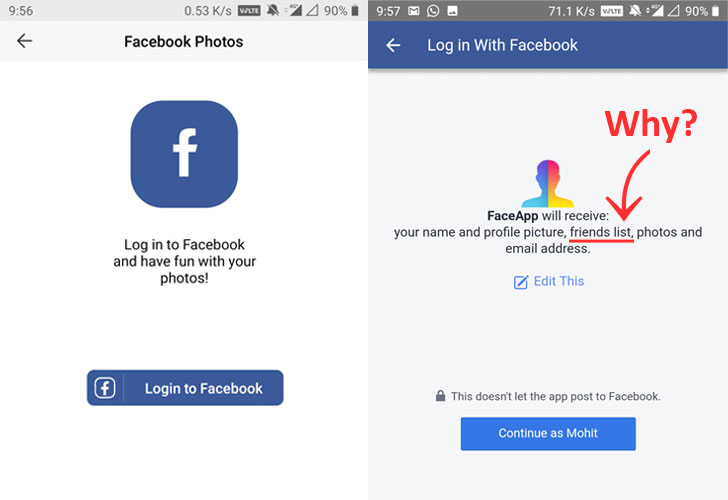
As you can see in the screenshot above, besides requesting for
access to your basic profile information and photos, FaceApp also
fetches the list of your Facebook friends “who also use and have
shared their friends’ lists with FaceApp.”
Have you yet asked yourself why this app asks for permission it
unlikely need to perform its intended function?
FaceApp Unnecessarily Access Your Facebook Friends Lists
Indian security researcher Athul Jayaram recently contacted The
Hacker News raising a huge red flag about the collection of users’
Facebook friend list data that FaceApp currently doesn’t use in any
way to function itself or power any of its features.
“When an app asks for permissions that are unnecessary to its
functioning, you should think twice before downloading it.”
“enhance the user experience,” but we failed to find one that
justifies the collection of this particular data.
The Hacker News that FaceApp had a feature called “Social
Stylist,” that was designed to let users invite their Facebook
friends to vote for their best style.
Apparently, the feature has now been discontinued, but the app
still collects your friend list when you choose to Login with
Facebook.
“We don’t have this data anymore and planning not to request this
permission soon. We used to have some social features (Social
Stylist: you could invite your friends to vote for the best style,
have a feed, etc.), those features needed this permission,”
Goncharov told The Hacker News.
“Please note that don’t require a Facebook login for FaceApp to
work, so only a few users are logged in.”
recently gone viral worldwide, crushing the App Store in 81
countries in just 6 days and climbing to number 1 spot from 1,370
on the top free apps chart in the US in only 5 days.
The Hacker News has also contacted Facebook, informing them about
this FaceApp practice and asking them to comment on the matter.
How to Stop FaceApp From Accessing Irrelevant Personal
Data
No doubt, “Login with Facebook” service makes logging in and
creating accounts for various third-party online services, apps and
games easier, but most of the times developers request access to a
lot of your data unnecessarily.
FaceApp works completely fine without even connecting your
Facebook account with the photo-editing app when you choose to
select photos from your device storage, but if you still want to
use the app to download Facebook photos, you can do it without
revealing your Friends List.
For those unaware, Facebook already has an option that allows
users to edit and explicitly choose what permissions they want to
grant an app from a list of requested permissions pre-defined by
its developer.
While connecting your Facebook account with FaceApp or any other
third-party service, Facebook displays a page with an edit button,
allowing users to toggle OFF permissions they don’t want
third-party apps to access.
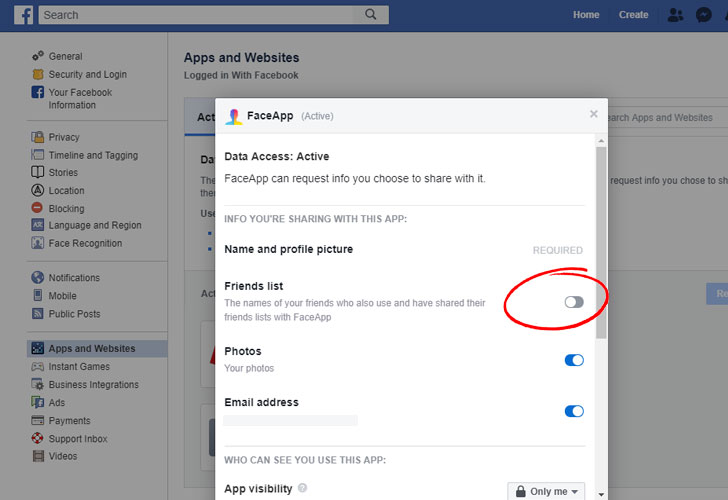
However, if you have already given FaceApp permission to access
your Friend list or any other unnecessary permission, you can also
edit it in your Facebook account settings under “Apps and Website”
section.
[2]
permissions would not erase your data from the FaceApp servers.
FaceApp CEO Goncharov suggests that users can request the
company to delete all data from FaceApp’s servers by using
‘Settings→Support→Report a bug’ with the word ‘Privacy’ in the
subject line.
Other Recent FaceApp Privacy Concerns
It is not the first time when FaceApp has been under scrutiny
related to privacy issues.
Just after a week of going viral, privacy advocates and media
raised concerns surrounding FaceApp’s loosely-phrased privacy
policy, which says that the use of the app grants the Russian-made
app a “perpetual” license to your photos, allowing it to use your
likeness, name, and username, for any purpose, without your
consent, forever, even if you delete it.
“You grant FaceApp a perpetual, irrevocable, nonexclusive,
royalty-free, worldwide, fully-paid, transferable sub-licensable
license to use, reproduce, modify, adapt, publish, translate,
create derivative works from, distribute, publicly perform and
display your User Content and any name, username or likeness
provided in connection with your User Content in all media formats
and channels now known or later developed, without compensation to
you. When you post or otherwise share User Content on or through
our Services, you understand that your User Content and any
associated information (such as your [username], location or
profile photo) will be visible to the public,”
FaceApp’s ‘Terms of Use’[3]
agreement says.
FaceApp wasn’t just accessing users’ submitted photos but also
grabbing the entire camera roll from users’ phones.
However, it was not the case, as French security researcher
Baptiste Robert, who goes by Elliot
Alderson[4] on Twitter, refuted the
speculation through his technical investigation, confirming that
the app only uploads a photo selected by a user to its server for
editing.
References
- ^
Athul Jayaram
(twitter.com) - ^
Apps and Website
(www.facebook.com) - ^
‘Terms of Use’
(faceapp.com) - ^
Elliot Alderson
(twitter.com)
Read more http://feedproxy.google.com/~r/TheHackersNews/~3/QTXkY_kfUNE/faceapp-facebook-privacy.html