IP address management takes a large part in the life of modern
network admins. Linux admins are expected to follow the best
practices in this regard. A carefully laid-out IPAM(IP Address
Management) workflow ensures better administration and
sustainability. Luckily, Linux offers a wide range of IP address
management tools which allow admins to perform their job much more
easily. Our editors have gone through a lot of such software before
picking the below 10 IPAM software for you. Continue reading in
order to find out which IP address management tools for Linux best
serve your purpose.
Our editors have selected both enterprise IPAM products and
open-source alternatives for this guide. So no matter whether you
are a corporation or a mere hobbyist, we have got you covered. We
have tried to discuss each software in detail – labeling their pros
and cons along the way.
1. Solarwinds IPAM
The Solarwinds IPAM solution is an enterprise-grade software
with many astounding features. It is a paid software that requires
professional licensing, and the company even provides customized
pricing plans. It is an exceptional software with a clean user
interface that makes management easier even for people with limited
tech skills. Moreover, Solarwinds IPAM integrates well with VMWare
and other virtual machine emulators[1]. So, if you’re a large
firm looking for enterprise-grade IPAM solutions, don’t forget to
check it.
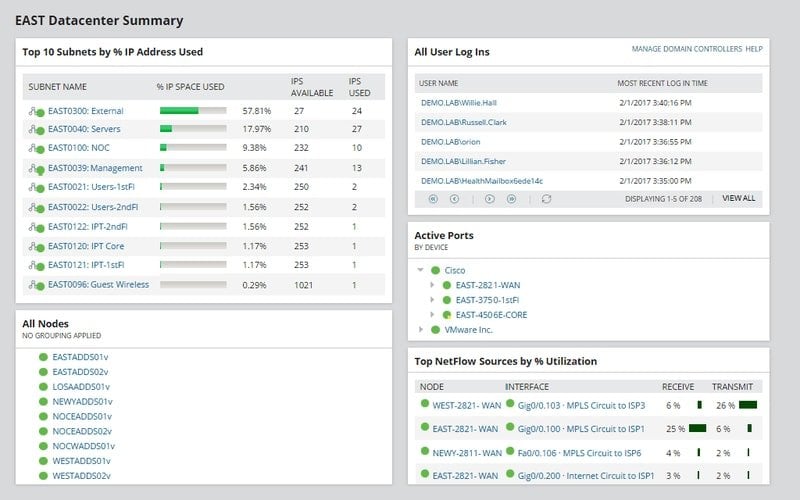
Features of Solarwinds IPAM
- Solarwinds IPAM allows admins to automate IP tracking and
address requests, which helps to minimize administration time. - It comes with a free 30-day trial version and an interactive
demo for helping customers to evaluate the application. - Solarwinds IP address management tool supports third-party app
integrations using its robust set of pre-built APIs. - It also offers useful alerting, troubleshooting, and reporting
features as well as support for cloud DHCP and DNS.
2. ManageEngine
OpUtils
The ManageEngine OpUtils suite is among the best IP address
management tools for Linux-based systems. It sports some of the
most exciting features wanted by modern network admins. Some of
them are role-based administration, tree view, DHCP server
monitoring, and so on. Although this is a professional software,
ManageEngine OpUtils also offers a convenient free version for
people on a budget. Enterprises can also get customized pricing
plans to better support their operations. Overall, it is a
competitive IPAM product aimed at network professionals.
Features of ManageEngine
OpUtils
- Admins can use this IPAM solution to effectively specify a
hierarchy of subnets based on their usage or location data. - ManageEngine OpUtils powerful global search feature provides an
in-depth analysis of IP address and subnet details. - It comes with an in-built set of robust network
tools[3] and provides excellent
notification alerts for network admins. - The compelling auditing features of this IPAM make security
audits much easier for enterprises. - ManageEngine OpUtils also offers some exceptional scanning
techniques alongside monitoring features for DHCP servers.
Download ManageEngine
OpUtils[4]
3. GestióIP IPAM
GestióIP IPAM is one of the best open-source alternatives to
commercial products like Solarwinds IPAM or the ManageEngine
OpUtils. It features a web-based user interface with extra emphasis
on automation and reduces many problems associated with IP
management. Although open-source, GestióIP has many premium
functionalities such as infrastructure integrations, robust APIs,
and excellent customer support. Moreover, you can get custom
development services if you feel like missing some features. So
overall, GestióIP is a feasible solution for both professionals and
home users.
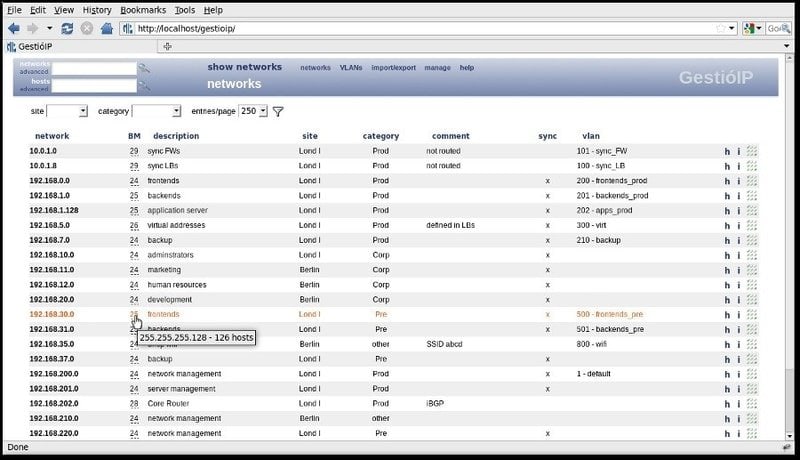
Features of GestióIP IPAM
- Users can access and manage their IP addresses using the
default web interface and aren’t required to install additional
client software. - GestióIP IPAM has a large set of integrated tools for
displaying network data like free network ranges, ping & DNS
checks, and so on. - It allows network discovery using SNMP, host identification via
ping, DNS, and SNMP as well as VLAN discovery. - Admins can directly import network data from spreadsheets and
export then to CSV documents if required.
4. Infoblox DDI
The Infoblox DDI solution integrates tools for DNS, DHCP, and
IPAM administration. It is a powerful, paid solution suitable for
large enterprises. If you are looking for high-performance,
automated network services for business clouds or virtualized
environments, Infoblox DDI can be a viable option for you. This DDI
solution is highly praised for its high-quality network services, which
makes it extremely easy to manage complex network infrastructures.
Enterprises can easily evaluate their network assets using this
professional IPAM solution. [6]
Features of Infoblox DDI
- Infoblox DDI helps in increasing the performance of cloud-based
business applications and SaaS products using diverse network
services. - The feature-rich, integrated analytics functionalities allow
admins to better manage and visualize their IP assets and helps in
auditing. - Infoblox can automatically detect rogue endpoints and
quarantine such devices to enhance network security and service
agility. - Admins can easily customize workflow templates and create
personalized reports as well as notification alerts from the
centralized UI.
5. BlueCat DDI
The BlueCat DDI is another powerful DDI product for modern
enterprises. Like Infoblox, BlueCat also offers several sought
after features such as active directory integration, DHCP MAC
filtering, on-demand deployments, data validation tools, and so on.
It is paid software with flexible pricing plans for corporations of
different sizes. Moreover, BlueCat is perfectly suitable for new
users due to its intuitive user-interface. So, if you are looking
for enterprise-grade IP address management tools for Linux, do not
forget to check out BlueCat.
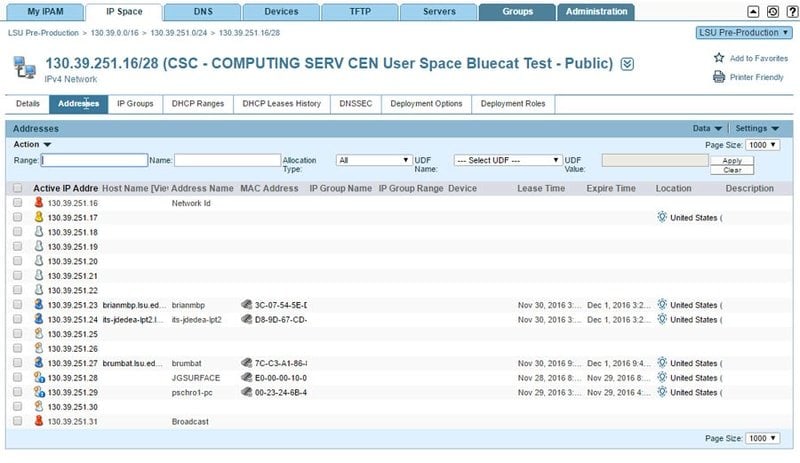
Features of BlueCat DDI
- It provides a compelling network manager that supports
role-based access control, IP auditing, resource tracking, and
custom workflows. - The neat, centralized user interface helps admins to plan and
model their IP resources based on network growth and traffic. - BlueCat employs several automated features such as on-demand
deployments, scheduled network discovery, and asset
reconciliation. - It offers an excellent set of API endpoints that allow admins
to integrate BlueCat with existing Linux CRM solutions[8].
6. IPplan
IPplan is a simple but rewarding IP address management tool that
provides a web-based user interface for managing IP resources. It
allows admins to view and manage their IP allocations very easily
and can be used to manage overlapping network spaces alongside
simple IP resources. IPplan is written using PHP and works
effortlessly on all modern Linux and BSD distributions[10]. Moreover, IPplan is
entirely open-source. So home users can easily use it as a
replacement to paid IPAM software like ManageEngine OpUtils and
Infoblox DDI.
Features of IPplan
- IPplan is tested with conventional Linux database management
systems[11] like MySQL, MSSQL,
PostgreSQL, and Oracle relational databases. - Admins can directly import network policies from TAB-separated
documents, XML files, and kernel routing tables. - IPplan allows admins to split or join networks without changing
the IP definitions and can easily find free address spaces. - The open-source nature of this free IPAM solution allows
developers to extend or modify the software as required.
7. LightMesh IPAM
LightMesh IPAM is an affordable IP address management tool aimed
at small to medium-sized businesses. It implements an elegant user
interface that is easy to administer and increases workflow
significantly. Some of its feature set include graphical IP
allocation, fast network discovery, customized permissions, and
effective integration of DNS & DHCP servers. Our editors really
liked the simple but effective design principles of this software,
which makes administration easier for people with limited tech
skills. Overall, LightMesh can be a viable solution for starting
enterprises.
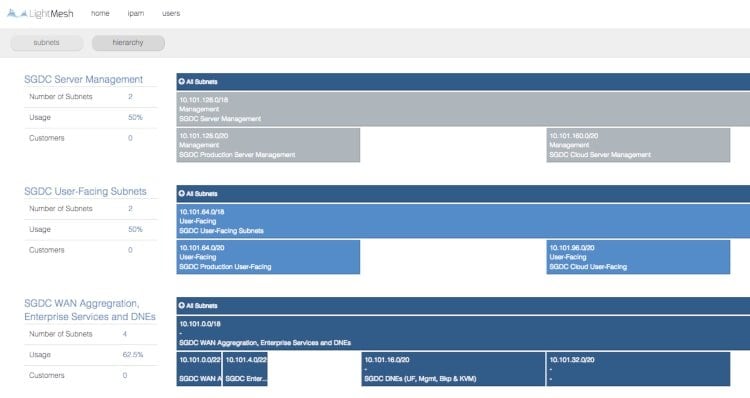
Features of LightMesh IPAM
- LightMesh IPAM comes with a useful command-based console
alongside the standard web interface and allows the convenient
discovery of IP devices. - The time machine feature allows admins to view their audit data
more accurately and review network policies on the
go[13]. - Admins can easily view all information related to IP
allocations, DNS, and DHCP servers from the centralized
interface. - LightMesh IPAM comes with a robust set of development APIs
which allows admins to integrate it with existing business
applications.
8. phpIPAM
phpIPAM is a free and open-source IPAM solution with an
effective feature set. It is written using PHP, as implied by its
name, and aims at providing a modern but lightweight alternative to
paid IPAM solutions. phpIPAM also leverages the MySQL database,
jQuery, and HTML5/CSS3 for its user interface. The developers
provide a nice introductory demo to help admins get a better grasp
of its features. Moreover, the open-source nature of this IPAM
project permits third-party devs to modify the software as
required.
Features of phpIPAM
- phpIPAM can be used to display free network spaces and IP
allocations automatically as well as domain authentications. - This IPAM solution comes with a simple but convenient IP
address calculator, which makes it easy to create new subnets. - Admins can directly import network policies from XLS/CVS files
and change access using a role-based hierarchy. - The REST APIs provided by this free IPAM is hard to find in
standard open-source IP address management tools for Linux.
9. NetBox
NetBox is certainly one of the best open-source IPAM solutions
reviewed by our editors. It comes with a simple but elegant user
interface that packs a serious punch in terms of functionalities.
NetBox was initially developed by the network engineering team at
DigitalOCean and has since evolved into a full-fledged IP
management application. It is very popular among open-source devs
due to its extensive customization abilities. So, if you are
looking for a free but powerful IPAM tool, consider checking
NetBox.
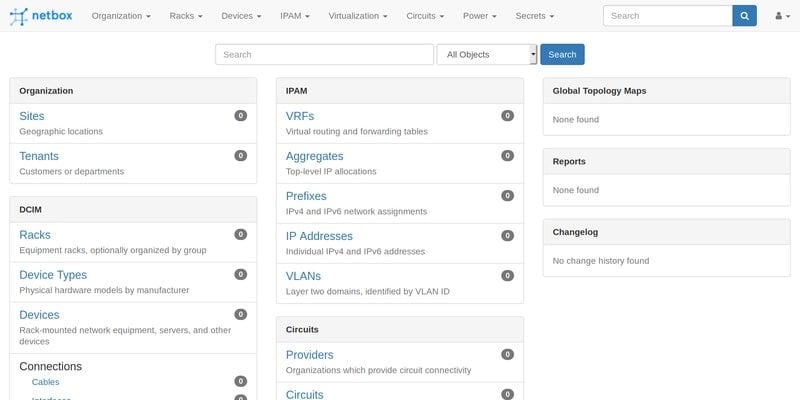
Features of NetBox
- NetBox can be used for viewing the IP addresses, subnet spaces,
VLANs, and VRFs alongside different device types. - It allows network admins to work with virtual machines,
clusters, encrypted storages, and several types of equipment
racks. - NetBox comes with in-depth documentation to help admins
familiarize themselves with the software effortlessly and for
modification purposes. - This open-source IPAM is developed using the Django framework
for Python and sits on top of a PostgreSQL database.
10. TeemIp
TeemIp is another free and open-source IPAM & DDI solution
popular among Linux network admins. It was developed as an
alternative to enterprise products like OpUtils and Solarwinds.
Although free, TeemIp is not short in features and can be used to
manage small to medium-sized networks pretty effectively. Another
useful feature of TeemIp is the ability to manage IT inventories
using the CMDB. So overall, TeemIp is a reasonable fit for people
who are searching for highly customizable IPAM products.
Features of TeemIp
- It comes with a compelling network discovery feature, which
makes it effortless to visualize and define IP networks. - TeemIp offers a simple but convenient IP address calculator,
which makes it easy to create new subnets. - Network admins can easily import essential network policies and
IP definitions from CSV datasheets. - TeemIp offers excellent customer support via their help desk
applications and professional support personnel.
Ending Thoughts
Since there is an abundance of robust IP address management
tools for Linux, many admins find it hard to choose the best option
for them. We have published this guide to help them in their
pursuit and have outlined 10 carefully chosen IPAM solutions that
work perfectly in Linux and BSD distributions. Our picks
include both commercial software and open source applications that
work nearly as good. Although enterprises will surely look into
professional IPAMs, free alternatives like phpIPAM and NetBox can
do the trick. So hopefully, you’ll find the best one that suits
your purpose. Let us know your choice in the comments section
below. [18]
References
- ^
virtual
machine emulators (www.ubuntupit.com) - ^
Download
Solarwinds IPAM (www.solarwinds.com) - ^
an
in-built set of robust network tools
(www.ubuntupit.com) - ^
Download
ManageEngine OpUtils (www.manageengine.com) - ^
Download
GestióIP IPAM (sourceforge.net) - ^
high-quality network services,
(www.ubuntupit.com) - ^
Download Infoblox DDI
(www.infoblox.com) - ^
Linux
CRM solutions (www.ubuntupit.com) - ^
Download
BlueCat DDI (www.bluecatnetworks.com) - ^
Linux
and BSD distributions (www.ubuntupit.com) - ^
conventional Linux database management
systems (www.ubuntupit.com) - ^
Download IPplan
(iptrack.sourceforge.net) - ^
review
network policies on the go
(www.ubuntupit.com) - ^
Download LightMesh IPAM
(ipam.lightmesh.com) - ^
Download phpIPAM
(phpipam.net) - ^
Download NetBox
(netbox.readthedocs.io) - ^
Download TeemIp
(www.teemip.net) - ^
Linux
and BSD distributions (www.ubuntupit.com)
Read more https://www.ubuntupit.com/best-ip-address-management-tools-for-linux/