granting Android app developers powers to forcefully install app
updates…but it is not true.
Instead, the tech giant is providing a new feature that will
help users to have up-to-date Android apps all the time and yes,
it’s optional.
Along with the launch of a number of new tools and features at
its Android Dev Summit 2018, Google has also
launched the a new API, called “In-app Updates,” which aims to help
developers ensure that users are running the latest and greatest
version of their app.
[1]
“We’ve heard that you’d like more controls to ensure that users are
running the latest and greatest version of your app. To address
this, we’re launching an In-app Updates API,” Google said[2].
How Does Android’s New In-app Updates API Work?
It should be noted that the Android’s new In-app Updates API
doesn’t force or lock out users from the app if they chose not to
update it.
Instead, the API has been designed to aggressively inform users
about the latest available updates and give them a smooth in-app
installation experience without closing the app or opening the
Google Play Store.
As explained by Aurash Mahbod, Google’s director of engineering, in
the above video, the In-app Updates API gives Android developers
two ways to push a new update to their users, as explained below:
1) Immediate in-app update (for critical patches) — App
developers can display a full-screen message to their users
informing them of a new update, which users can choose to download
(if they want) and install immediately right then and there, within
the app itself, before they can use the app.
For obvious or whatever other reasons, users can deny to update
immediately and continue using the app, in case they are not
connected to Wi-Fi or are low on the battery.
2) Flexible in-app update (for regular updates) — Using
this option, Android app developers can display a small “available
update” notification to users, giving them an option to accept it
and then keep using the app while the new version app is downloaded
in the background.
Once the app is downloaded, it will get installed the next time the
user re-opens the app.
Flexible update also gives users the “Not Now” option, which
users can select in case they don’t want to install the update.
The concept is good and definitely not new, as many applications
already have custom mechanisms to determine if users are running an
outdated version, then prompt them to install the latest version
from the Play Store. However, the new API makes this whole process
standard, smooth and easy, giving users a great new
experience.
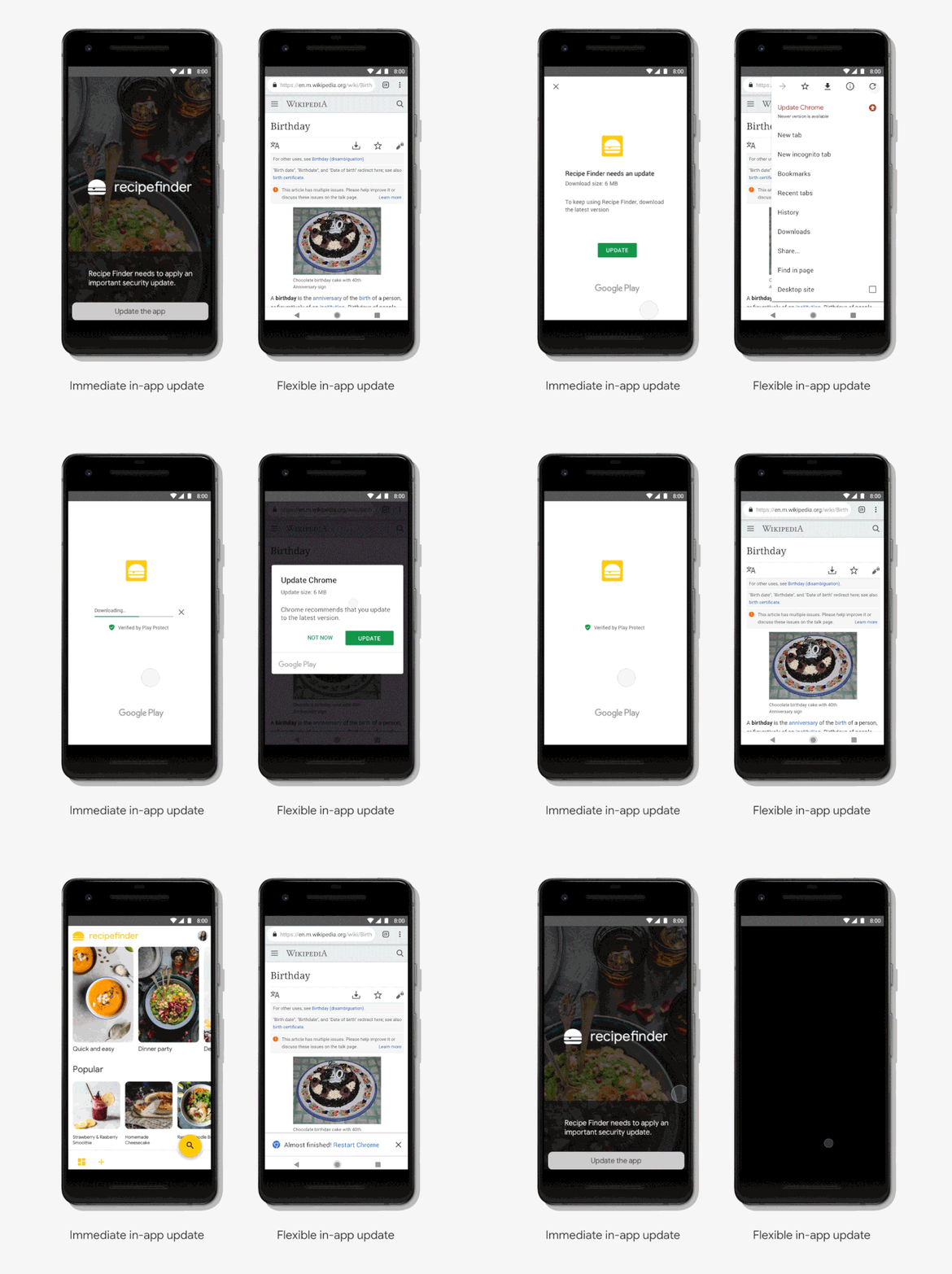
Updates API in Google Chrome for Android and is making the new API
available to developers who are early access partners. It will be
available to all developers soon.
Google also says that Android developers will have the ability
to completely customize the update flow so that it feels like part
of your app, which indicates that all apps will not have the same
in-app update experience.
References
- ^
Android Dev Summit 2018
(developer.android.com) - ^
said
(android-developers.googleblog.com)
Read more http://feedproxy.google.com/~r/TheHackersNews/~3/mTIM6g-SW9A/android-in-app-updates-api.html