
regretted it, or an embarrassing text to your boss in the heat of
the moment at late night, or maybe accidentally sent messages or
photos to a wrong group chat?
Of course, you have. We have all been through drunk texts and
embarrassing photos many times that we later regret sending but are
forced to live with our mistakes.
Good news, Facebook is now giving us a way to erase our little
embarrassments.
After offering a similar feature to
WhatsApp users two years ago, Facebook is now rolling out a
long-promised option to delete text messages, photos, or videos
inside its Messenger application starting from Tuesday, February 5.
You Have 10 Minutes to Delete Sent Facebook Messages
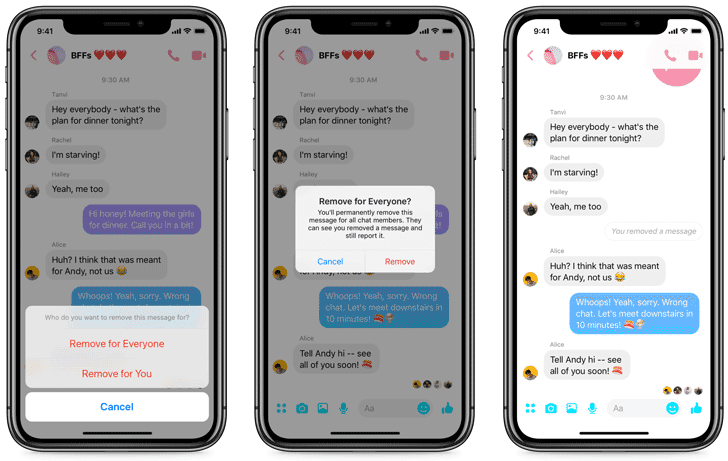
The unsend feature allows users to delete a message within 10
minutes of sending it, for both individual and group chats.
Previously, Messenger offered the “delete” option that allowed
users to only delete messages for them—but the recipient can still
see the message. Now, the option includes two choices “remove for
everyone” and “remove for you,” giving users more control over
their already sent messages.
after it was revealed last year that Facebook CEO Mark Zuckerberg
had an option to “delete” messages that were sent on the messaging
app.
As promised, the company has now made the unsend
option[2] available to all
users.
Obviously, unsend does not mean unseen. If you send a message
and the receiver see it immediately after receiving it, and before
you think of deleting it, the unsend feature won’t help
you.
But your quickest move might help you unsend the message so that it
is not seen on the other side of the conversation.
Here’s How to Unsend Messages on Facebook Messenger
It is quite simple and straightforward.
- Long press on the message you want to remove.
- You will get both a standard emoji response window on the top
of that message, as well as three options at the bottom of the
screen: Copy, Remove, and Forward. - Selecting the Remove option will then display two options:
“Remove for Everyone” and “Remove for You.” - You know what you have to do now. Tapping the “Remove for
Everyone” option will remove the message from the chat so that
nobody can see the message after that.
It should be noted that the unsend feature also works for
removing photos and videos sent to a user.
Just like WhatsApp, Messenger will replace the removed chat
bubble with a text message notifying everyone in the conversation
that the message has been removed. But remember, you will have up
to 10 minutes to remove the message after being sent.
The Remove for You option will function in the same way the
previous Delete option works.
Facebook is not the first one to offer an “unsend” feature in
its chat services, including WhatsApp and Messenger. Secure
messaging app Telegram has also been allowing its users to remove
messages since years.
References
- ^
similar feature to WhatsApp users
(thehackernews.com) - ^
unsend option
(messengernews.fb.com)
Read more http://feedproxy.google.com/~r/TheHackersNews/~3/5Ix4Ne7DvVU/unsend-delete-facebook-message.html