Organizational and Operational Security
Derrick Rountree, in Security for Microsoft Windows System Administrators, 2011
Differential Backups
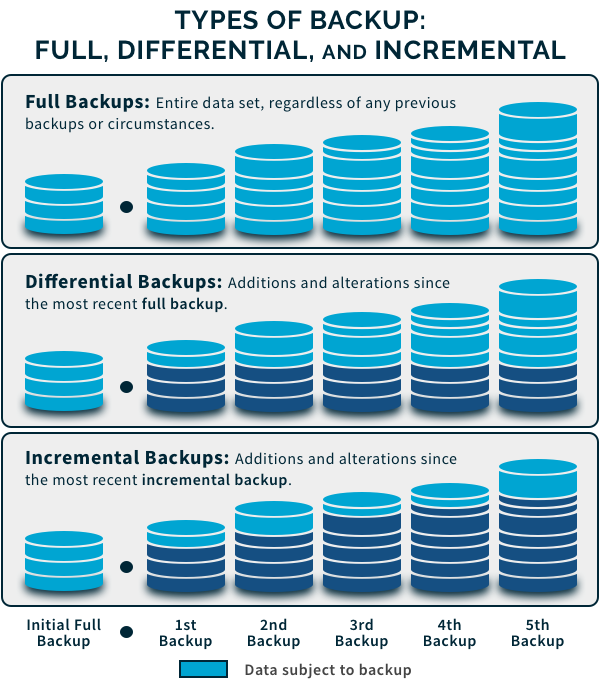
Differential backups are usually used in combination with full backups. Differential backups will only back up all files that have the archive bit set. Because of this they will take a shorter amount of time to perform than full backups or copy backups. Differential backups do not reset the archive bit. So basically, every time you perform a differential backup you will be backing up every file that changed since the last full backup was performed. Complete restores using differential backups will generally take longer to perform than full backup restores because you will have to restore both the last full backup and the last differential backup.
MCSE 70-293: Planning, Implementing, and Maintaining a High-Availability Strategy
Martin Grasdal, … Dr.Thomas W. Shinder, in MCSE (Exam 70-293) Study Guide, 2003
Differential Backups
The differential backup type is sometimes used as a substitute for the incremental type. A differential backup collects data that has changed or been created since the last full (normal) or incremental backup, but it does not clear the archive bit on the file. It can also be used after a copy or differential backup, but as with an incremental backup, every file with the archive attribute set is backed up.
The differential backup is advantageous when you want to minimize the restoration time. A complete system restore with a full/differential backup combination, as illustrated in Figure 8.36, requires only the most recent full backup and the most recent differential backup. Differential backups start with small volumes of data after a recent full or incremental backup, but often grow in size each time, because the volume of changed data grows. This means that the time to perform a differential backup starts small but increases over time as well. In theory, if full or incremental backups are infrequent, a differential backup could end up taking as long and reaching the same volume as a full backup.

Figure 8.36. Full (Normal) Backup/Differential Backup Pattern
 NOTE
NOTE
You may also want to use combinations of full (normal), incremental, and differential backups. For instance, if you begin with a full backup over the weekend, it might make sense to perform differential backups on Monday and Tuesday. By later in the week, the quantity of changes may be such that a differential backup cannot be performed overnight. An incremental backup on Wednesday will likely solve the problem, with differential backups continuing after that. Using this system, the restore times are still minimized, because the maximum restoration would involve tapes from the full, incremental, and one differential backup. If a failure occurred before Wednesday, it may take tapes from only the full and, possibly, a differential backup to restore the system.
Domain 7
Eric Conrad, … Joshua Feldman, in CISSP Study Guide (Second Edition), 2012
Differential
Another approach to data backup is the differential backup method. Whereas the incremental backup only archives those files that had changed since any backup, the differential method backs up any files that have been changed since the last full backup. The following is an example of a backup schedule using tapes, with weekly full backups on Sunday night and daily differential backups.
Each Sunday, a full backup is performed. For Monday’s differential backup, only those files that have been changed since Sunday’s backup will be archived. On Tuesday, again those files that have been changed since Sunday’s full backup, including those backed up with Monday’s differential, will be archived. Wednesday, Thursday, Friday, and Saturday would all simply archive all files that had changed since the previous full backup.
Given this schedule, if a data or disk failure occurs and there is a need for recovery, then only the most recent full backup and most recent differential backup are required to initiate a full recovery. Though the time to perform each differential backup is shorter than a full backup, as more time passes since the last full backup the length of time to perform a differential backup will also increase. If much of the data being backed up regularly changes or the time between full backups is long, then the length of time for a differential backup might approach that of the full backup.
Domain 9
Eric Conrad, … Joshua Feldman, in CISSP Study Guide, 2010
Differential
Another approach to data backup is the differential backup method. While the incremental backup only archived those files that had changed since any backup, the differential method will back up any files that have been changed since the last full backup. The following is an example of a backup schedule using tapes, with weekly full backups on Sunday night and daily differential backups.
Each Sunday, a full backup is performed. For Monday’s differential backup, only those files which have been changed since Sunday’s backup will be archived. On Tuesday, again those files which have been changed since Sunday’s full backup, including those backed up with Monday’s differential, will be archived. Wednesday, Thursday, Friday, and Saturday would all simply archive all files that had changed since the previous full backup.
Given this schedule, if a data or disk failure occurs and there is a need for recovery, then only the most recent full backup and most recent differential backup are required to initiate a full recovery. Though the time to perform each differential backup is shorter than a full backup, as more time passes since the last full backup the length of time to perform a differential backup will also increase. If much of the data being backed up regularly changes or the time between full backups is long, then the length of time for a backup might approach that of the full backup.
Domain 7: Security Operations (e.g., Foundational Concepts, Investigations, Incident Management, Disaster Recovery)
Eric Conrad, … Joshua Feldman, in CISSP Study Guide (Third Edition), 2016
Differential
Another approach to data backup is the differential backup method. While the incremental backup only archived those files that had changed since any backup, the differential method will back up any files that have been changed since the last full backup. The following is an example of a backup schedule using tapes, with weekly full backups on Sunday night and daily differential backups.
Each Sunday, a full backup is performed. For Monday’s differential backup, only those files that have been changed since Sunday’s backup will be archived. On Tuesday, again those files that have been changed since Sunday’s full backup, including those backed up with Monday’s differential, will be archived. Wednesday, Thursday, Friday, and Saturday would all simply archive all files that had changed since the previous full backup.
Given this schedule, if a data or disk failure occurs and there is a need for recovery, then only the most recent full backup and most recent differential backup are required to initiate a full recovery. Though the time to perform each differential backup is shorter than a full backup, as more time passes since the last full backup the length of time to perform a differential backup will also increase. If much of the data being backed up regularly changes or the time between full backups is long, then the length of time for a backup might approach that of the full backup.
Domain 9
Eric Conrad, in Eleventh Hour CISSP, 2011
Incremental and Differential
Incremental backups archive only files that have changed since the last backup of any kind. Differential backups archive any files that have been changed since the last full backup.
Did you Know?
Assume that a full backup is performed every Sunday, and either incremental or differential backups are performed daily from Monday through Saturday. Data is lost after Wednesday’s backup.
If incremental daily backups were carried out in addition to the weekly full backup, the tapes from Sunday, Monday, Tuesday, and Wednesday are needed to recover all archived data. If differential backups were carried out in addition to the full weekly backup, only the Sunday and Wednesday tapes are needed.
Domain 7: Operations Security
Eric Conrad, … Joshua Feldman, in Eleventh Hour CISSP (Second Edition), 2014
Incremental and differential
Incremental backups only archive files that have changed since the last backup of any kind was performed. Differential backups will archive any files that have been changed since the last full backup.
Did You Know?
Assume a full backup is performed every Sunday, and either incremental or differential backups are performed daily from Monday to Saturday. Data is lost after Wednesday’s backup.
If incremental daily backups were used in addition to the weekly full backup, the tapes from Sunday, Monday, Tuesday, and Wednesday would be needed to recover all archived data.
If differential backups were used in addition to the full weekly backup, only the Sunday and Wednesday tapes would be needed.
SQL Server Backup and Recovery
In Designing SQL Server 2000 Databases, 2001
The Database Maintenance Plan Wizard
It is often desirable to group a number of tasks into a single job. For example, after each complete or differential backup, you might want to run a backup of the transaction log and, before starting the backup, do a integrity check of the database to ensure that the database backup is not corrupted. In this case, you can create maintenance plans manually or use the Database Maintenance Plan Wizard (see Figure 7.5). A major advantage of this wizard is that not only can you group more maintenance tasks in one job, you can also execute this same plan on more than one database. The more experienced database manager can construct maintenance plans using the command-line utility sqlmaint. With the Database Maintenance Plan Wizard, though, you are not able to implement backups based on files and/or filegroups.

Figure 7.5. The welcome screen of the Database Maintenance Plan Wizard.
The Database Maintenance Plan Wizard will lead you through the following steps:
- 1.
-
Select databases.
- 2.
-
Choose the data optimization information options.
- 3.
-
Choose the database integrity check options.
- 4.
-
Specify the database backup plan.
- 5.
-
Specify the transaction log backup plan.
- 6.
-
Select the report options.
On completion of these steps, the wizard will first give a summary of the maintenance plan to be created. If the summary is correct, you can finish it, and then the maintenance plan job will appear in the Database Mainte-nance Plans list of the SQL Server Enterprise Manager (see Figure 7.6). The list of jobs can hold all backup tasks for all databases. Every one of them can be scheduled or manually run. (The latter is also true even if the task is scheduled.)

Figure 7.6. Maintenance plans available through the SQL Server Enterprise Manager.
Transact-SQL
T-SQL is an extension of the standard SQL that enables you to build scripts that directly interact with SQL Server. Instead of using the Enterprise Manager, the Create Database Backup Wizard, and the Data-base Maintenance Plan Wizard, you can write your own maintenance scripts. Under the hood, the jobs and tasks you create are recorded in the master database and run using T-SQL. Although you need to have some SQL programming experience to use T-SQL, the big advantage is that your can make tailor-made backup and restore scripts.
T-SQL incorporates the commands BACKUP and RESTORE. Additionally, SQL Server 2000 has stored procedures that enable you to build your own backup and restore jobs. You can use the Create Job Wizard to automate the execution of the T-SQL scripts.
Locking Down Your XenApp Server
Tariq Bin Azad, in Securing Citrix Presentation Server in the Enterprise, 2008
Understanding Backup Types
The types of backups you can choose in most commercial backup programs as well as the backup utility provided with Windows 2003 are as follows:
- ▪
-
Normal
- ▪
-
Incremental
- ▪
-
Differential
- ▪
-
Copy
- ▪
-
Daily
As you will see in the paragraphs that follow, different types of backups archive data in different ways. Because of this, the methods used to back up data will vary between businesses. One company might make normal backups every day, while another might use a combination of backup types. Regardless of the types used, however, it is important that data be backed up on a daily basis so that large amounts of data won’t be lost in the event of a disaster.
Note
Some types of data require that you follow special procedures to back them up. The System State data, discussed in the text, is one such special situation.
Another special situation occurs when you want to back up files that are associated with Windows Media Services (WMS). To back up these files, you must follow the procedures that are outlined in the WMS Help files. You cannot use the normal backup procedures to back up and restore these files.
Microsoft recommends that if you want to back up database files on an SQL server, you should use the backup and restore utilities that are included with SQL Server instead of the Windows Server 2003 Backup utility.
If your Windows Server 2003 computer is running cluster services (Enterprise or Datacenter editions), you need to perform an ASR backup for each cluster node, back up the cluster disks in each node, and then back up individual applications that run on the nodes.
Before describing each of the backup types, it is important to understand that the type chosen will affect how the archive attribute is handled. The archive attribute is a property of a file or folder that’s used to indicate whether a file has changed since the last time it was backed up. As you will see in the paragraphs that follow, depending on the backup type used, the archive attribute of a file is or is not cleared after it is backed up. When the file is modified, the archive attribute is set again to indicate it has changed and needs to be backed up again. Without the archive attribute, your backup program is unable to tell whether files need to be backed up or not. Here is a description of each backup type in more detail:
- ▪
-
Full Backup The full backup, as its name implies, backs up everything specified by the user performing the backup operation. A full backup can include the operating system, system state data, applications, and any other data. With a full backup, everything that is backed up has the file system archive bit reset (cleared).This allows the incremental and differential backup types to determine if the file needs to be backed up. If the bit is still clear, the other backup types know that the data has not changed. If the bit is set, the data has changed, and the file needs to be backed up. The full backup is usually the first backup performed on a server. It takes the longest of all the backup types to complete, because it backs up all specified files, regardless of the state of the archive attribute. A full backup consumes the largest amount of backup media of any backup type. Depending on the amount of information chosen to back up and the underlying backup technology involved, it may require multiple backup media to complete. The main advantage of the full backup type is the ability to rapidly restore the data. All of the information is contained in a single backup set when this type of backup is used. The disadvantages of full backups are high media consumption and long backup times.
- ▪
-
Incremental Backups During an incremental backup operation, all specified files have their archive bit examined. If the bit is set, the file is backed up, and then the bit is cleared. This backup type is used to back up data that has changed or been created since the last full (normal) or incremental backup. It can also be used after a copy or differential backup, but because these do not reset the archive attribute, there is no way for the incremental backup to tell which files have changed since one of those backups last ran. As a result, every file with the archive attribute set is backed up. The incremental backup type is used between full backups. It is quick to perform, collects the least amount of data, and consumes the smallest amount of media. A complete restore, however, requires the last full backup and every incremental backup (in sequence) since the full backup was performed. The primary benefits of using the full/incremental backup combination are time and media savings. The main drawback of this combination is longer and more complex restore operations if there are long periods between full backups.
- ▪
-
Differential Backups The differential backup type is sometimes used as a substitute for the incremental type. A differential backup collects data that has changed or been created since the last full (normal) or incremental backup, but it does not clear the archive bit on the file. It can also be used after a copy or differential backup, but as with an incremental backup, every file with the archive attribute set is backed up. The differential backup is advantageous when you want to minimize the restoration time. A complete system restore with a full/differential backup combination requires only the most recent full backup and the most recent differential backup. Differential backups start with small volumes of data after a recent full or incremental backup, but often grow in size each time, because the volume of changed data grows. This means that the time to perform a differential backup starts small but increases over time as well. In theory, if full or incremental backups are infrequent, a differential backup could end up taking as long and reaching the same volume as a full backup.
- ▪
-
Volume Shadow Copy More of a Windows 2003 feature than a backup type, Volume Shadow Copy allows you to back up all files on the system, including files that are open by applications or processes. In previous versions of Windows, the applications would need to be stopped or users logged out to allow these files to be closed and backed up using a backup program. With Volume Shadow Copy, these files can continue to remain in use without affecting the integrity of the backup. This feature is enabled by default, but it may need to be disabled if data managed by some critical applications would be affected by the use of Volume Shadow Copy
Warning
Not all backups are the same. Remember that normal and incremental backups set the archive attribute after backing up a file, but differential, copy, and daily backups do not. You can use normal, copy, and daily backups to restore files from a single backup job, whereas you can use incremental and differential backup types in conjunction with normal backups. This is because differential backups back up all files that have changed since the last normal backup (regardless of whether they were backed up by a previous differential backup), while incremental backups only back up files that have changed since the last normal or incremental backup and were not backed up previously.