As threats grow and attack surfaces get more complex, companies
continue to struggle with the multitude of tools they utilize to
handle endpoint security and management. This can leave gaps in an
enterprise’s ability to identify devices that are accessing the
network and in ensuring that those devices are compliant with
security policies. These gaps are often seen in outdated
spreadsheets that are used to track and manage asset inventory,
configurations, vulnerabilities, and more. Ultimately, this
increases organizational risk while stifling efficiency and
productivity.
That’s why unified security and endpoint management has gained
ground, as noted in Gartner’s Hype
Cycle for Endpoint Security, 2022[1]. As part of the market’s
need to gain a clearer, real-time picture of their devices and
security posture, Syxsense launched its Enterprise platform last
year to address the three key elements of endpoint management and
security: vulnerabilities, patch, and compliance. According to
Syxsense, unified security and endpoint management (USEM) is the
answer to enabling teams to gain control over the widespread use of
personal devices and the increasing mobility of company-owned
devices on the network.
With that in mind, they developed support of mobile devices in
addition to traditional devices like desktops and laptops, based on
a Zero Trust framework for user and device-based access to
resources that’s easy to use. This gives teams the ability handle
endpoint management and security operations from a single
platform.
We recently took a closer look at the Syxsense Enterprise
platform.
First things first
Syxsense’s platform[2]: What you need to know
before diving in:
- A 14-day free trial is available and trial users have access to
Syxsense Enterprise, with features like Zero Trust and MDM
available that you can test with your own devices. - Cortex automation engine: While many other solutions offer
methods for detecting vulnerabilities, Syxsense Enterprise offers
automatic remediation of those vulnerabilities. The automation is
through a drag and drop interface that doesn’t require any coding
and supports task and workflow sequencing and policy
implementation. A number of common workflows have already been
built out and you can run them on your devices without having to
set up the automation on your own.
To facilitate this product review, the team at Syxsense gave us
access to the latest version of their platform. Here’s what we
found:
Getting Started
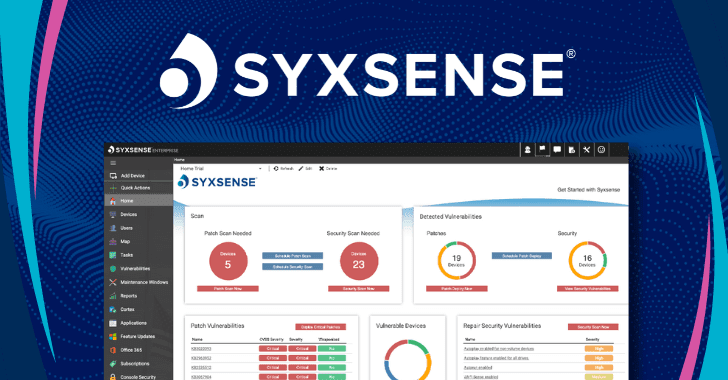
Using the Syxsense platform, security teams can gain visibility
into their environment and discover the endpoints communicating
over the network. Let’s say I’m a system administrator interested
in trying the service. This is the first screen I see. In the
corner it shows where I can easily Add Devices so I know where to
start and I can see the dashboards where information on the devices
I add will display.
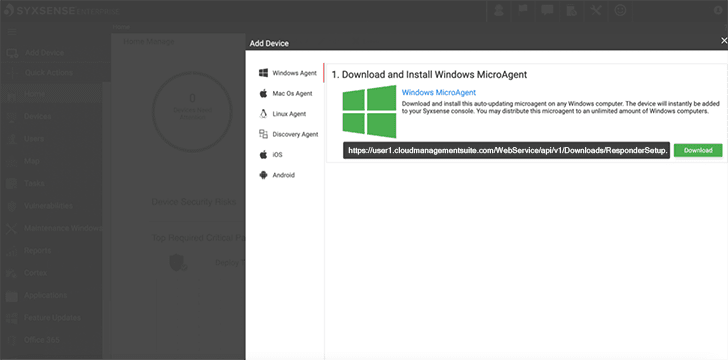
When I go to add a device, it shows me the supported device
types and the downloadable agent for each type. I also see the
Discovery Agent where I can find and add multiple devices that have
the agent downloaded already.
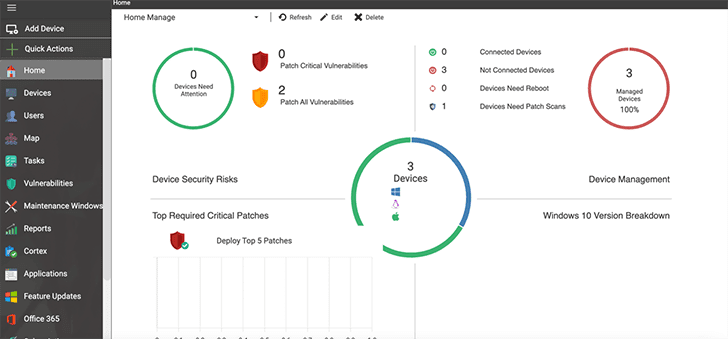
Using the devices I just added to my inventory, I can test what
the platform can offer.
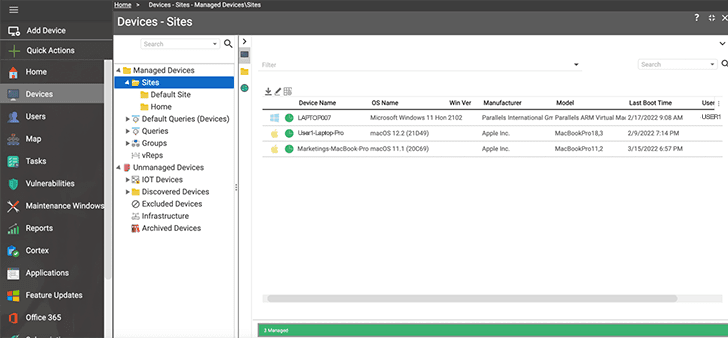
The ‘Devices’ button on the left side panel shows you all the
devices that have already been added to your inventory.
What caught my attention was the little circle next to the
device name. The green, orange, or red color of the circle
indicates the current health of the device based on patch status
and active vulnerabilities so you can see the health of your
devices at a glance.
By right clicking “Queries”, you can now access the Query
Designer and filter your devices with different attributes you
select.
For a sample, I ran a query for all devices running Windows OS.
After you run the query, you can perform tasks on the devices
returned from your selection.

In the Syxsense Enterprise platform, you have access to tons of
different types of tasks, including: Security Scan, Patch Deploy,
Software Deploy or Security Remediation. I decided to run a patch
deployment to see what would happen.

As you can see, the console shows you six steps to outline the
patch deployment task I want to perform, starting with identifying
the list of devices the task will target. I created a new query for
devices with critical patches.
After I selected my query, Syxsense showed me a set of options
for managing the content deployed to the targeted devices.
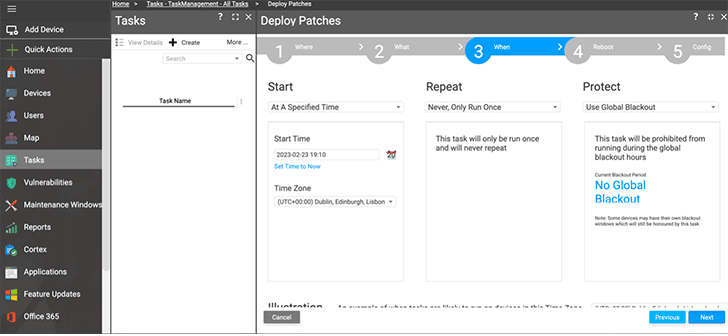
I can immediately deploy my patch or, if I don’t want to run the
task right now, the platform gives me options for scheduling my
deployment. I can deploy at a specified time with a calendar
selection or make the task reoccur on a schedule.
After I ran the patch deployment task, it was easy to see which
devices were missed. I can then choose to rerun the task on new
devices or devices that were unavailable during the deployment
window.
What caught my attention next is the Cortex workflows.
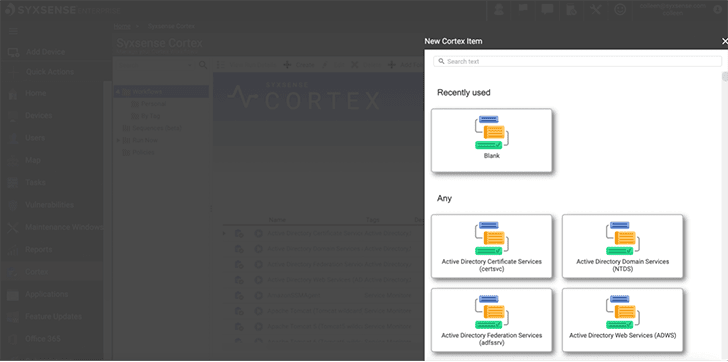
You can build sequences of different security actions that run
automatically based on the status of targeted devices. I added
multiple paths for the automation to follow based on the success or
failure of each action.
It’s simple to use. I didn’t need to write any code, the
platform is designed so you can just drag and drop actions into the
builder and customize them as you build. There’s also quite a few
server maintenance workflows already built on the platform that I
can just select and run right away.
I selected the Zero Trust Trusted – Security workflow and named
it “Security Posture”.
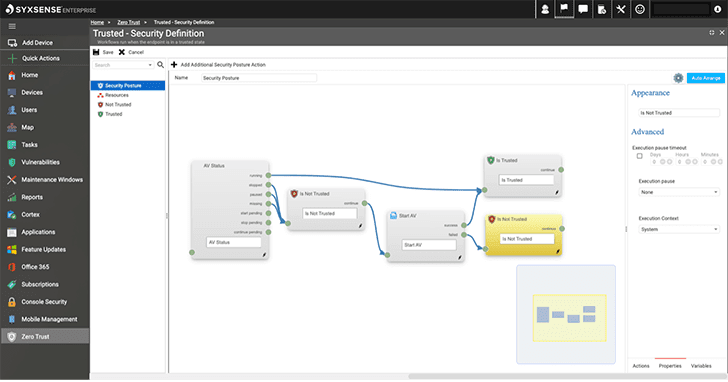
Once I have configured the workflow, I can choose the devices I
want to run it on and how often.
My task was to test the system, so I wanted to see how well the
platform handles reporting on the different actions I’ve performed.
In the Syxsense platform, you can deploy a task to run a
report.
The platform offers a lot of options for reports. There’s even
reports for HIPAA, PCI and SOX compliance.
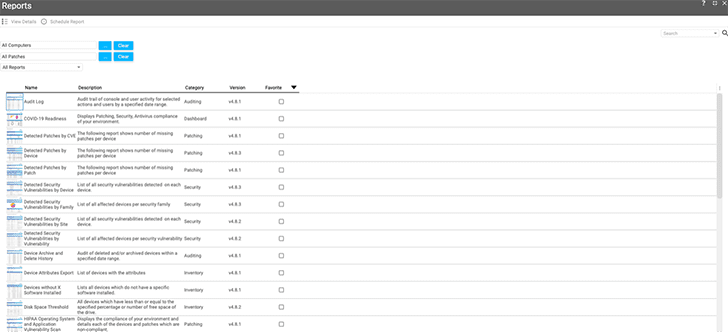
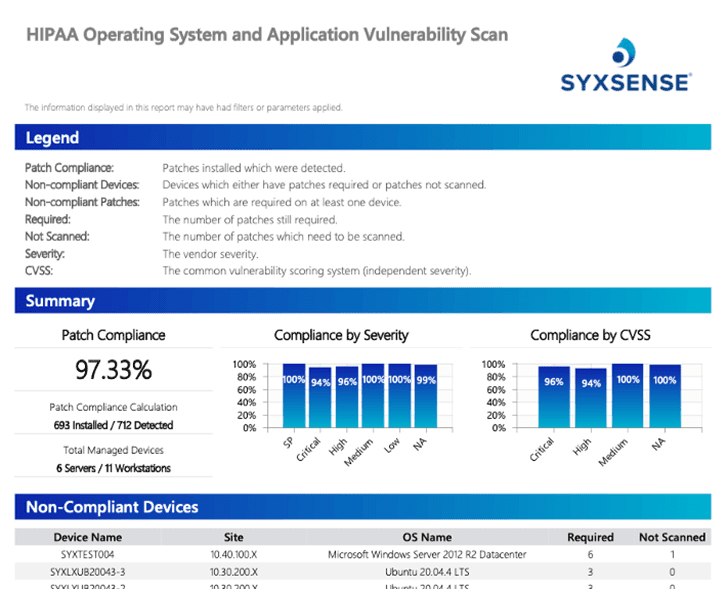
I decide to run the “HIPAA Operating System and Application
Vulnerability Scan” report.
It gives me a lot of information and there’s a summary section
that shows me the percentage of patch compliance and graphs for
compliance by severity and compliance by CVSS. This is an
interesting report with a detailed overview of your environmental
compliance, with great visualizations already built in.
Conclusion
Syxsense Enterprise is a solid endpoint management and security
platform with many features to make day-to-day IT and security
operations easier. Many companies rely on multiple tools to handle
vulnerability scanning, patch management, configuration management,
mobile devices, and remediation, but Syxsense combines it all in
one solution. It’s easy to see where a single solution like
Syxsense could reduce costs and risk while improving
efficiency.
If you’d like to see more, you can sign up for a demo of Syxsense
here[3].
Found this article interesting? Follow us on Twitter [4]
and LinkedIn[5]
to read more exclusive content we post.
References
- ^
Gartner’s Hype Cycle for Endpoint
Security, 2022 (www.gartner.com) - ^
Syxsense’s platform
(www.syxsense.com) - ^
demo of
Syxsense here (www.syxsense.com) - ^
Twitter
(twitter.com) - ^
LinkedIn
(www.linkedin.com)
Read more https://thehackernews.com/2023/03/syxsense-platform-unified-security-and.html