100 years (!) ago; the industry should have, as well.
Yet COVID-19 took businesses – more like the entire world – by
surprise. Very few were prepared for the explosion of remote
access, and the challenge of instantly shifting an entire
organization to work from anywhere.
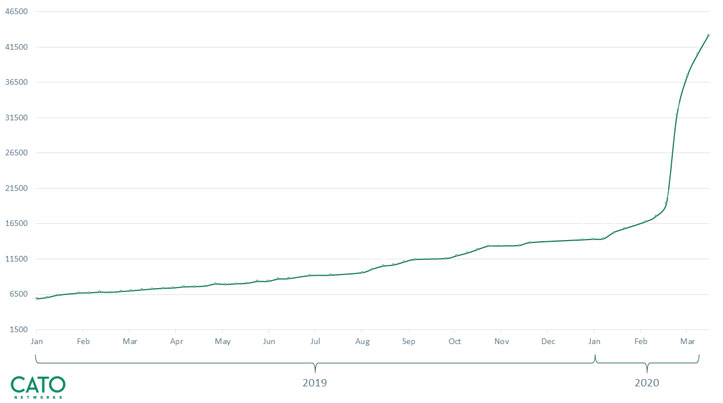
Cato Networks shared its increase in remote
access[1] usage post coronavirus
outbreak. The trend is clear.
Remote access has become an essential pillar for ensuring
business continuity; nevertheless, the requirements to enable this,
especially at a time of crisis, can be overwhelming.
The industry is undergoing a paradigm shift. In the past, most
works were performed from the office, and only a subset of the
business operated remotely. Today, most (if not all) users require
secure and optimized access to applications from remote.
sporadic access by a subset of the userbase. If you think that
scaling legacy VPN is simple, think again. It’s complex, expensive,
and takes too long to be considered an instant solution for an
urgent need.
What’s needed is a remote access solution that evolved to fit
the new reality, supporting an entire business globally, at scale,
and delivering strong authentication.
This is where Software-defined
Perimeter (SDP)[2], also referred to as
Zero Trust Network Access (ZTNA), comes in. SDP is a new approach
for delivering secure remote access to applications, whether
on-premises or in the cloud. And, it certainly presents a viable
alternative for legacy VPN.
Cato SDP with Instant Access
We decided to take a look at what Cato Networks has to offer. The
company recently announced the first Secure Access Service
Edge (SASE) based clientless access service. It enables
enterprises to deliver instant work-from-everywhere, at scale. SASE
is a new global cloud-native architecture built to provide
cloud-scale secure and optimized access to users in offices, on the
road, and at home from any device.
Cato offers both a client and clientless solution. Client-based
is ideal for corporate devices that need access to all
applications, and clientless is ideal for BYOD and 3rd party access
to internal web-based applications.
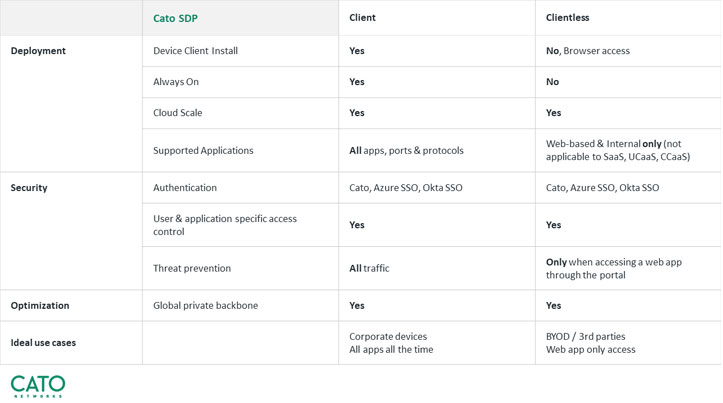
built-in enterprise security and optimization capabilities. Take a
look at Cato’s detailed client vs. clientless comparison table.
Cato’s solution is called Cato SDP with Instant Access. Let’s
see if it stands up to its name.
What Was On Our Checklist
We identified four fundamental requirements for supporting
work-from-everywhere in a zero-trust environment: scalability,
availability, performance, and security.
And these were the exact capabilities we checked in Cato
SDP.
- Scalability — Cato’s SASE
platform delivers a cloud-native, globally distributed
architecture. This enables unlimited scalability while supporting
any number of users working from anywhere across the globe. - Availability — Cato SDP includes
high availability by design, which guarantees that all users and
applications have a secured connection with the nearest SASE Point
of Presence (PoP). Since SASE is a global service, available PoPs
are automatically identified, eliminating the need for high
availability configuration and redundancy planning. - Performance — Application
performance can’t be guaranteed over the unpredictable public
Internet. Instead, connecting to Cato’s SASE platform – with its a
private global backbone and built-in WAN optimization – delivered
continuous optimal performance. - Security — Finally, Cato provides
a fully integrated security stack, including:
Secure authentication: Multi-Factor Authentication (MFA) and Single
Sign-On (SSO). Advanced security: Application-aware Next-Generation
Firewall (NGFW) and threat prevention such as Intrusion Prevention
System (IPS) and Next Generation Anti Malware (NGAM).
Service Walkthrough
We wanted a complete picture of the product and set forth to test
Cato SDP, from the initial steps of configuring a new user and
connecting the client, to enforcing security and optimizing
performance.
New remote user configuration:
We found the process of configuring a new user to be remarkedly
straightforward. You can either import users from the Active
Directory or configure them manually by simply entering the user’s
name and email.
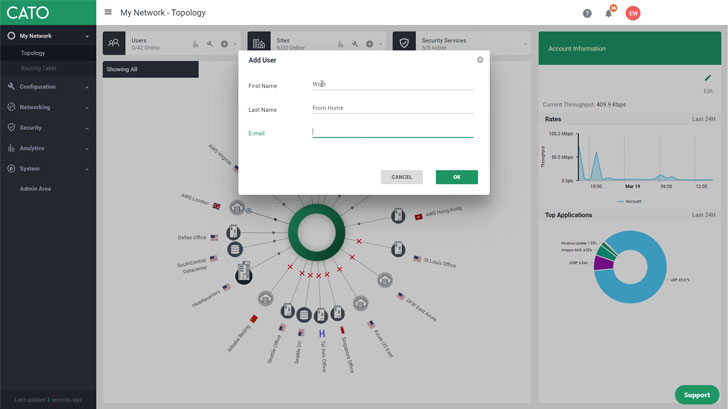
to a portal.
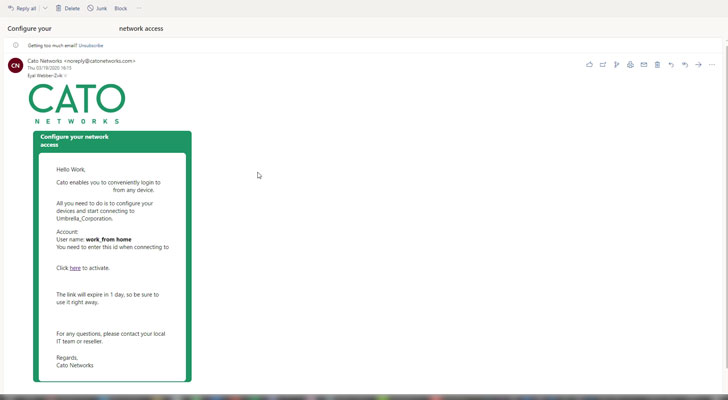
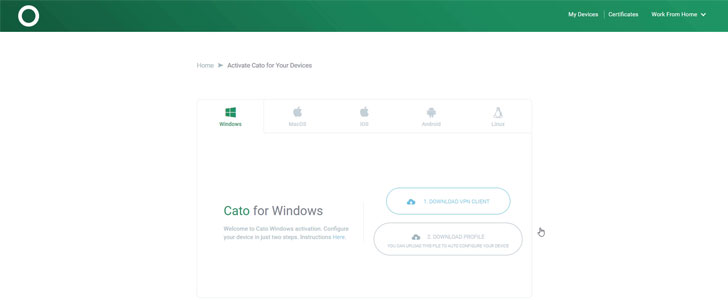
operating system; and also download the Cato profile for quick
on-boarding.
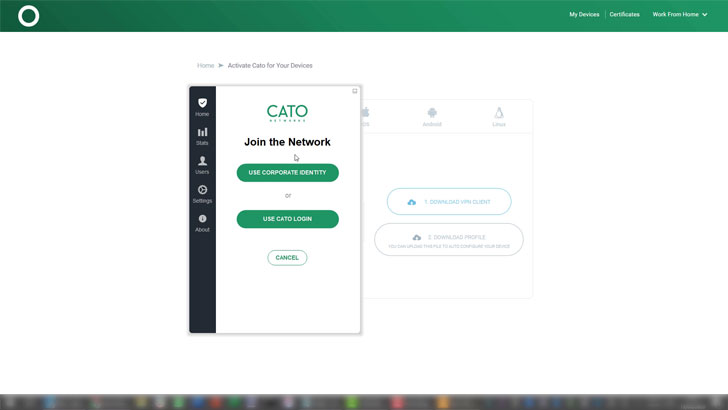
Client setup and connectivity:
To install the client and connect for the first time, users can
select Use Corporate Identity, which takes them to an SSO portal;
or Use Cato Login, which uses the profile file just downloaded,
eliminating the need to enter details. Configuring a user took
literally less than a minute.
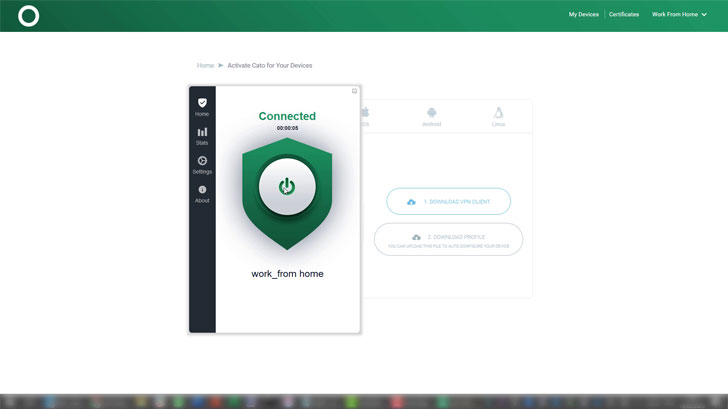
the nearest available PoP and connects the user to the
network.
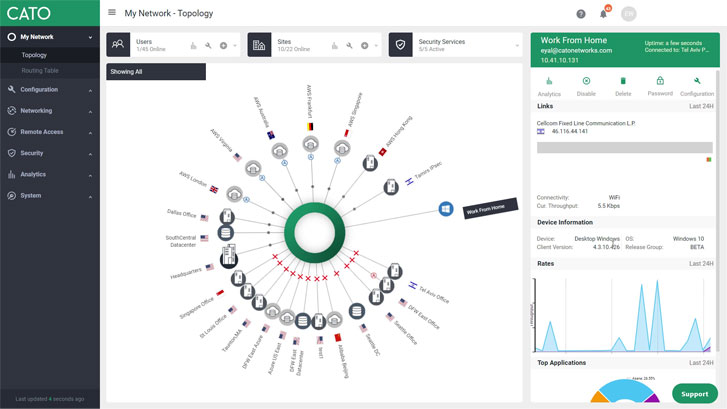
real-time, and by clicking on the user, you’ll get additional
information such as operating system, the user’s ISP, the PoP to
which it’s connected, etc.
Security enforcement:
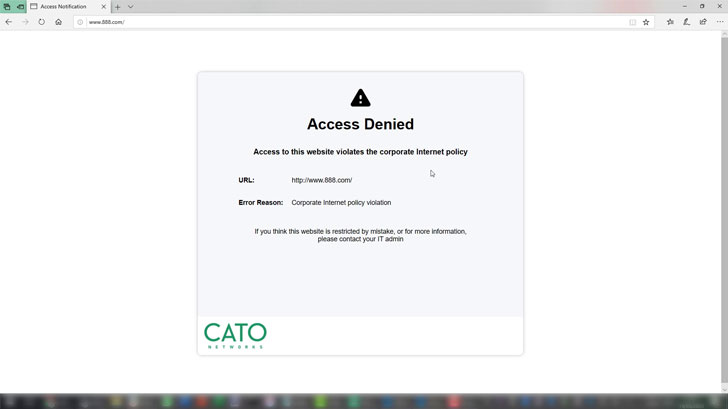
Once connected, the user is automatically protected by the
corporate security stack. We verified this by browsing to the 888
websites, which is denied access according to corporate
policy.
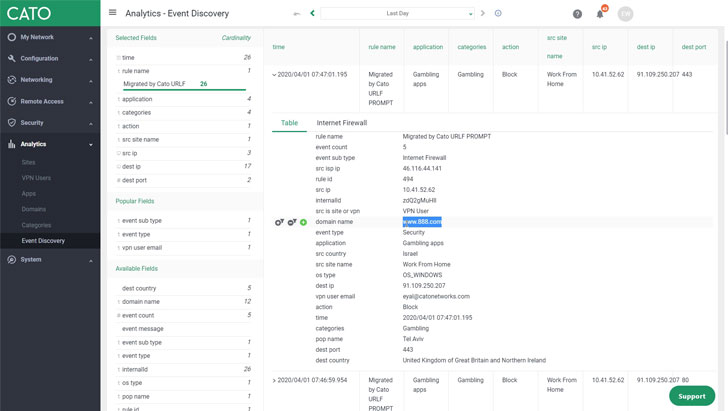
option. What grabbed our attention most was the Event Discovery
option, where you can gain instant insights on events for further
investigation.
Drilling down into our “event,” you’ll see that our attempt to
access 888 was blocked. You can view further details such as the
site category, operating system, and even the destination country
hosting the web application.
and then tried to browse to the same denied website. Well, without
Cato’s security the 888 site was easily accessed.
Performance optimization:
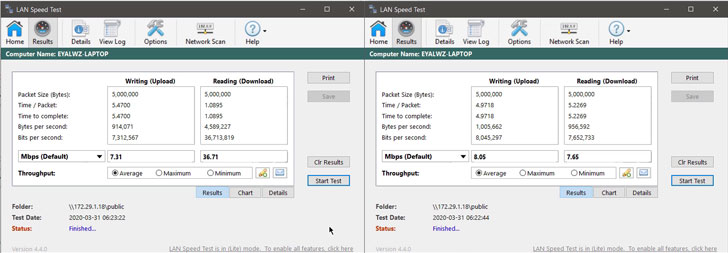
Finally, in order to assess Cato’s built-in WAN optimization, we
performed a file transfer test between a VPN user and a remote
server using a 3rd party app called LAN Speed Test. Comparing the
results with Cato’s WAN optimization (image on the left) and
without (image on the right); resulted in a whopping 5x faster file
transfer! Huge improvement in user experience.
Clientless Access
Cato also enables accessing corporate applications via a web-based
portal. We found this to be very convenient. All that’s needed is
to authenticate yourself once through SSO, and that connects you to
the authorized applications – all under the same enterprise-wide
security policy.
Clientless access eliminates the need to install any additional
software, and this is especially convenient for 3rd party
users.
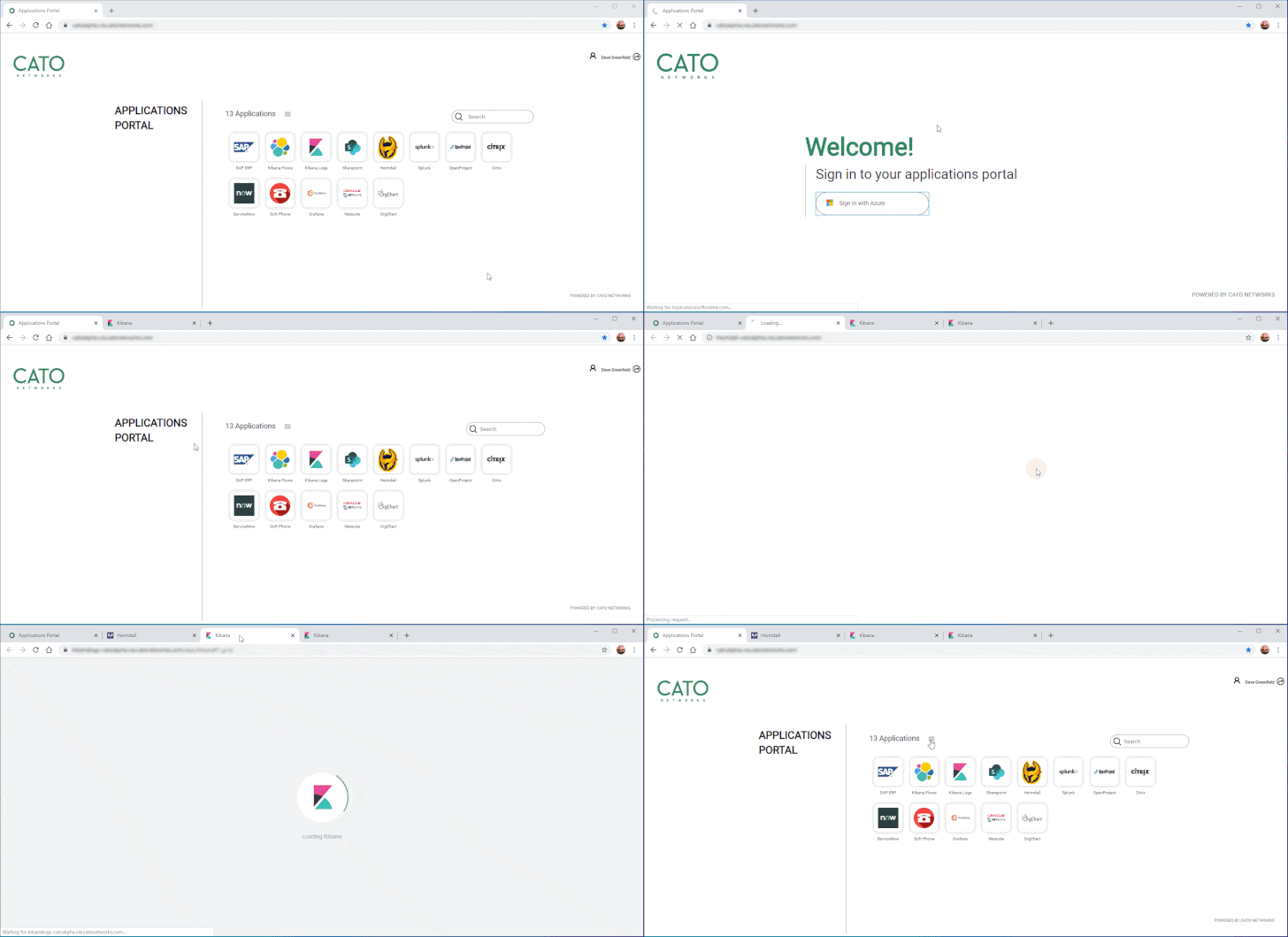
Currently, Cato’s clientless access provides support for web
applications only. To access legacy non-web applications, you can
simply install the client (described above).
Cato SDP is provided as part of SASE, acting as the new
enterprise WAN. This eliminates the need to install any agents on
the application servers. Instead, all that’s needed is to connect
the relevant networks, with their respective applications, to
Cato’s SASE platform. Then, configure the clientless access option,
which is instantly available from anywhere.
Key Takeaways
Cato promised instant remote access at scale. And that’s exactly
what we experienced. Cato SDP received excellent scores on all our
checklist criteria (scalability, availability, performance,
security), which is very impressive.
Who wouldn’t be impressed, and even encouraged, with a SASE
service that is ready to deploy today.
Cato’s tagline is The Network for Whatever’s Next. Just like the
Scouts, who are always prepared, this SDP Instant Access use case
demonstrates that Cato is delivering on its tagline’s promise.
Kudos Cato!
References
- ^
remote access
(www.catonetworks.com) - ^
Software-defined Perimeter (SDP)
(www.catonetworks.com) - ^
Secure Access Service Edge (SASE)
(www.catonetworks.com) - ^
Event Discovery
(www.catonetworks.com)
Read more http://feedproxy.google.com/~r/TheHackersNews/~3/H22GzJ7VM0c/cato-sdp-cloud-scale.html