tech company to hold on to your location history and web activity
data.
Google has introduced a new, easier, privacy-focused auto-delete
feature for your Google account that will allow you to
automatically delete your Location History and Web and App
Activity data after a set period of time.
Google’s Location History feature, if enabled, allows the
company to track locations that you have visited, while Web and App
Activity tracks websites you have visited and apps you have
used.
Until now, Google allowed you to either altogether disable the
Location History and Web and App Activity feature or manually
delete all or part of that data, providing no controls for regular
deletion so that users can manage their data efficiently.
However, an AP
investigation last year revealed that even if you turn off the
Location History feature in all your accounts, Google services on
Android and iPhone devices continue to track
your movements.
Just last month, it was also revealed that Google maintains a
database containing detailed location records from hundreds of
millions of phones around the world, called Sensorvault[3], that’s reportedly being
used by law enforcement agencies to solve crime cases.
Following the revelation, U.S. Congress last week asked Google
CEO Sundar Pichai to issue a briefing by May 10 on a series of
questions on how the Sensorvault
database is used and shared by the company.
[4]
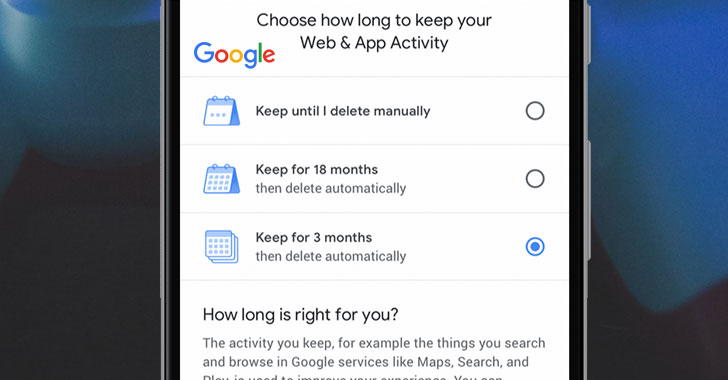
After concerns and feedback from users over their data, Google
introduced the
new auto-delete feature, allowing users to now select how long they
want their location and web activity data to be saved on the
company’s servers by providing them to choose between three
options:
- Keep until I delete manually
- Keep for 18 months then delete automatically
- Keep for 3 months then delete automatically
Here’s How You Can Enable Auto-Delete Option
Though the option is not available yet, the GIF shared by Google
describes the step-by-step process to activate the auto-delete
feature:
- Visit Google homepage and tap on your profile picture in the
upper-right corner - Click on the Google Account button.
- Select the Data & Personalization tab and click Web & App
activity - Select “Choose to delete automatically.”
- Choose between “Keep until I delete manually,” “Keep for 18
months,” and “Keep for 3 months” options - Click Next and confirm your choice
With these settings enabled, the search engine giant will regularly
clear out every bit of the location history and web activity data
Google holds on you every three months or every 18 months as per
your choice.
For users who don’t want the company ever to track their location
or web and app history can simply turn off their “Location History”
and “Web and App Activity” settings.
According to Google, the auto-delete feature for Location
History and Web & App Activity will be rolling out “in the coming
weeks.”
Facebook last year announced a similar privacy feature called
Clear
History[6], allowing users to
delete cookies and history ‘associated with your account’ manually.
The feature has been delayed and is now expected to launch this
fall.
References
- ^
AP investigation
(thehackernews.com) - ^
continue to track your movements
(thehackernews.com) - ^
Sensorvault
(thehackernews.com) - ^
Sensorvault database is used
(thehackernews.com) - ^
introduced
(www.blog.google) - ^
Clear History
(thehackernews.com)
Read more http://feedproxy.google.com/~r/TheHackersNews/~3/MlPtRyrXK2Y/google-web-location-history.html