
FaceTime app for a few days.
A jaw-dropping unpatched privacy bug has been uncovered in
Apple’s popular video and audio call app FaceTime that could let
someone hear or see you before you even pick up their call.
The bug is going viral on Twitter and other social media
platforms with multiple users complaining of this privacy issue
that can turn any iPhone into an eavesdropping device without the
user’s knowledge.
The Hacker News has tested the bug on iPhone X running the latest
iOS 12.1.2 and can independently confirm that it works, as flagged by 9to5Mac
on Monday. We were also able to replicate the bug by making a
FaceTime call to a MacBook running macOS Mojave.
Here’s How Someone Can Spy On You Using FaceTime Bug
The issue is more sort of a designing or logical flaw than a
technical vulnerability that resides in the newly launched Group
FaceTime feature. Here’s how one can reproduce the bug:
- Start a FaceTime Video call with any iPhone contact.
- While your call is dialing, swipe up from the bottom of your
iPhone screen and tap ‘Add Person.’ - You can add your own phone number in the ‘Add Person’
screen. - This will start a group FaceTime call including yourself and
the person you first called, whose audio you will able to listen in
even if he/she hasn’t accepted the call yet.
What’s more? It is also being reported that if the person you first
called presses the volume down button or the power button to
silence or dismiss the call (in case he/she is in a meeting or
busy), his/her iPhone camera will also turn on.
This will broadcast the video from their iPhone, while their iPhone
screen still displays the incoming call screen.
How to turn OFF FaceTime on your iPhone and Mac
When reached out to Apple, the company responded media by saying,
“We’re aware of this issue, and we have identified a fix that will
be released in a software update later this week.”
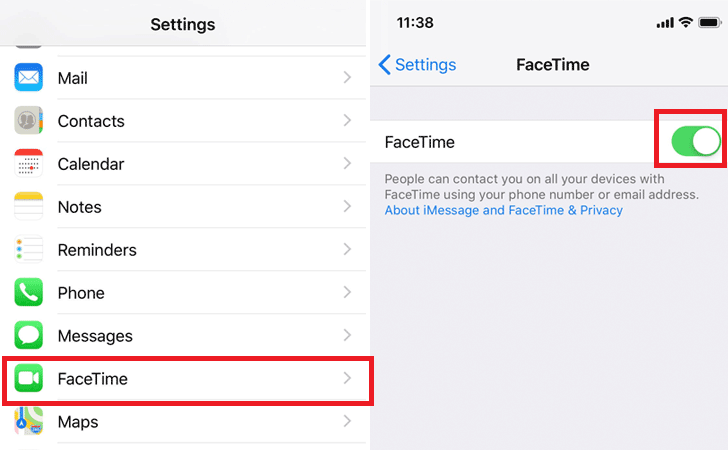
for users is to disable the FaceTime video calling feature on their
iPhone.
To disable FaceTime:
On iPhone, just head on to Settings, scroll down to find
‘FaceTime’ icon and tap the toggle button to switch the feature
off.
On Mac, open FaceTime app on your Mac, click on FaceTime
at the top left corner in the menu bar and then click ‘Turn off
FaceTime.’
Read more http://feedproxy.google.com/~r/TheHackersNews/~3/wchPqheVex8/apple-facetime-privacy-hack.html